Hello!
Here is update on Z-Library access that may help if you are experiencing connection issues:
1) Use one of the
official links (try each one, as some may be blocked in your country):
http://z-lib.sk/
https://z-lib.fm/
https://z-library.sk/
https://z-library.gy/
https://z-library.qa/
2) If the page stops responding and you see an "Invalid response" error or our "Oops, Connection Failed" message, try using the
mirror links:
https://z-library.website/
https://zlib.bz/
https://zlib.re/
https://zliq.online/
https://zlib.tw/
Castom mirror
https://libb.la
Mirror pages may warn that a link could be a phishing link. The warning looks like this:
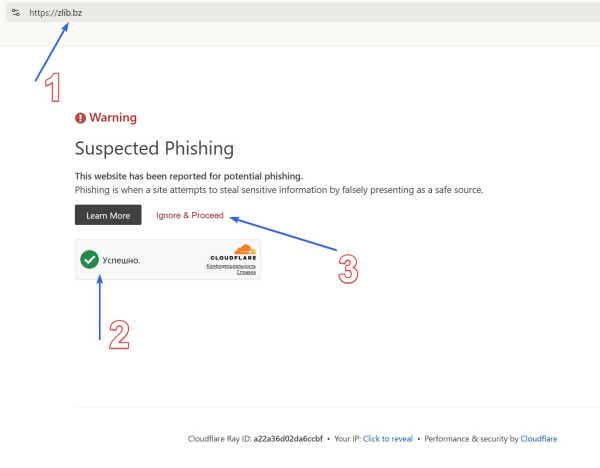
- Check the spelling of the domain; it shouldn't differ even by a dash
- Pass the anti-bot check, wait for it to load, and check the "Are you human?" box
- Click the Ignore & Procced button
Unfortunately, some of our domains have been marked as phishing due to complaints, which we are already disputing.
3) We also offer a regularly updated
app for Windows 10+
4) and
browser extension for Mozilla Firefox
5)
Android app ver 1.11.4 is work but no longer supported
You can see message like on screenshot, because starting August 1, Google and Android is restricting the installation of apps from sources other than its own store
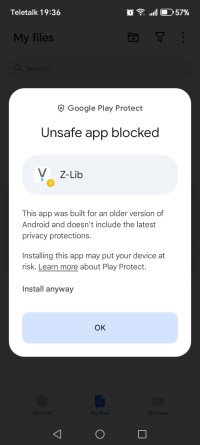
Our app is completely safe and works on modern devices.
Click Install Anyway to continue installing the app.
6) Creating your own personal Telegram bot for downloading books is an excellent solution,
check it here
7) You can always get an up-to-date link via an automated email.
Send any email to
blackbox@z-library.so, and you will receive a link to access the site in reply. Please wait 3–5 minutes and check your Spam, Promotions, and Junk folders.
8) Please SAVE this post or
download file from menu on site.
All these methods, including .onion links, can be found on the Z-access page
https://library-access.sk/
https://go-to-library.sk/